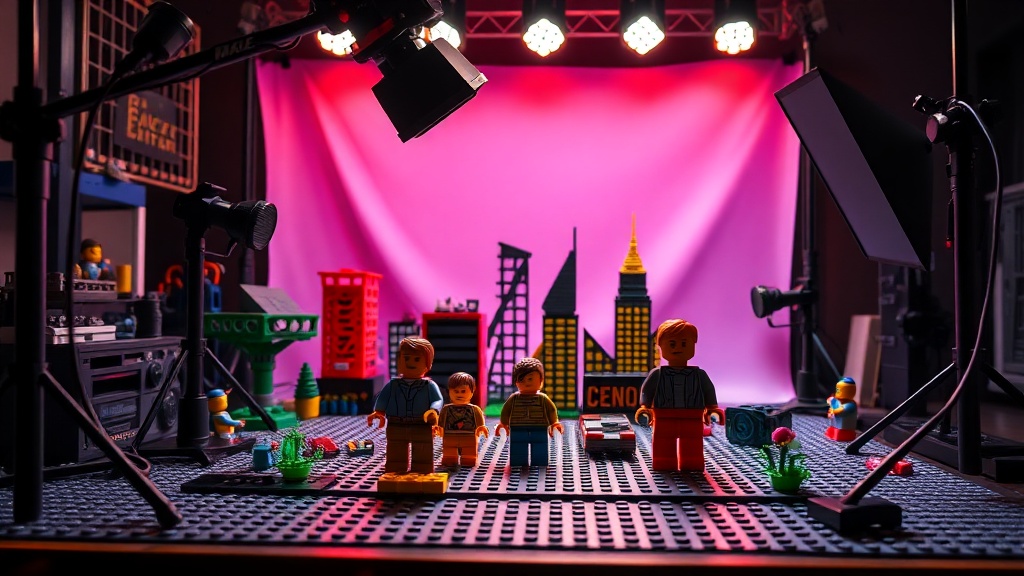
Setting Up a Professional Photography Studio for Your LEGO Models

High-end LEGO photography can drive the resale value of a retired set by hundreds of dollars in a single auction. Most collectors settle for a quick snap on a phone, but if you want to document your investment or sell a rare build, you need a controlled environment. This guide covers the exact hardware, lighting techniques, and backdrop setups required to transform a plastic model into a professional-grade photograph. We'll look at everything from macro lenses to light diffusion to ensure your builds look as impressive as they do in person.
What is the Best Lighting for LEGO Photography?
The best lighting for LEGO photography is a multi-point setup using soft, diffused light sources to prevent harsh glares on plastic surfaces. Because LEGO pieces—especially smooth tiles and transparent elements—are highly reflective, a single direct flash will ruin your shot with "hot spots." You want to wrap the light around the model rather than hitting it head-on.
If you're just starting, a single light source is often too aggressive. I usually recommend a three-point setup: a key light, a fill light, and a backlight. The key light provides the main illumination, the fill light softens the shadows, and the backlight (or rim light) helps separate the model from the background. This is especially important for dark builds like the LEGO Star Wars UCS sets, where a lack of contrast can make the model look like a black blob.
Don't forget about the "specular highlight." This is that tiny bit of white light that defines the edges of a brick. Without it, your model looks flat. If you're working with a small scale, you might want to look into building a custom lighting kit specifically for your display models. It's a much cheaper way to get professional results than buying expensive studio strobes.
Here is a quick breakdown of common light types for collectors:
| Light Type | Best For | Pros | Cons |
|---|---|---|---|
| LED Panels | General builds | Consistent color, easy to control | Can be "stiff" without diffusion |
| Ring Lights | Minifigures | Even lighting, no shadows | Can look artificial |
| Natural Light | Casual shots | Free, beautiful tones | Unpredictable and inconsistent |
How Much Does a LEGO Photo Studio Cost to Build?
A professional LEGO photo studio can cost anywhere from $50 to over $500 depending on whether you use existing gear or buy specialized equipment. You don't need a massive budget to get great shots, but you do need to spend wisely on things that actually impact light quality. Most of the "magic" happens in the diffusion, not the light source itself.
For a budget-friendly setup, you can start with a simple light tent. These are collapsible fabric boxes that surround your model. They act as a giant softbox, scattering light so you don't get those annoying reflections on shiny LEGO pieces. You can find basic ones on Amazon for under $30. If you're more serious, you might want to invest in a dedicated tripod and a macro lens.
The most expensive part of a studio isn't the lights—it's the lens. If you're using a DSLR or a high-end mirrorless camera, a 1:1 macro lens is what allows you to capture the tiny details of a minifigure's expression or the texture of a LEGO print. If you're using a smartphone, your "studio" is really just about controlling the environment around the phone. A simple piece of white poster board can serve as a great backdrop for a small scale model.
One thing to watch out for: heat. If you're using high-powered studio lights, they can actually get hot enough to slightly soften certain types of plastic or cause issues with older, more brittle elements. Always check the temperature of your lights before placing them inches away from a build. It's a small detail, but it's one of those things that can go wrong if you aren't paying attention.
How Do You Choose the Right Backdrop for Minifigures?
The best backdrop for minifigures is a matte-finish surface that provides a sense of scale and context without distracting from the subject. You want to avoid anything shiny, as the light will bounce off the background and create a distracting glow behind your model.
Depending on the theme of your LEGO set, your backdrop should change. For a Star Wars build, a dark, textured grey or even a black velvet cloth works wonders. For a LEGO City or Creator set, a light wood grain or a clean white surface is better. The goal is to create a "stage" for your model. If the background is too busy, the viewer's eye won't know where to land.
I've found that using different materials can change the "feel" of a photo instantly:
- Black Velvet: Perfect for "void" shots where you want the model to look like it's floating in space.
- Acrylic Sheets: Great for creating a reflective "floor" look, but you'll need to be careful with reflections.
- Matte Paper: The easiest and cheapest option for a clean, professional look.
- Textured Fabric: Good for adding a sense of "ground" or "environment" to a scene.
One trick I use is the "infinity curve." This is when you use a single piece of paper or fabric that curves from the vertical to the horizontal. This eliminates the "line" where the floor meets the wall, making the background look infinite. It's a classic technique used in product photography, and it works perfectly for LEGO models. It makes the build look like it's part of a larger world rather than just sitting on a desk.
If you're shooting at a very small scale, you'll also need to think about your depth of field. A shallow depth of field (where the background is blurry) can look cool, but if it's *too* shallow, the front of your model might be in focus while the back is a blur. This can be frustrating when you're trying to show off a detailed build. Make sure your aperture is wide enough to keep the entire subject sharp.
When you're ready to move from a tabletop to a professional setup, don't forget to keep your workspace clean. Dust is the enemy of high-resolution photography. A single speck of dust on a LEGO brick will look like a giant boulder once you zoom in with a macro lens. I always keep a can of compressed air and a soft brush nearby to clean the models right before the shutter clicks.
It's easy to get caught up in buying the most expensive gear, but the fundamentals of light and shadow are what actually make a photo look "pro." Start with what you have, master the light, and then upgrade as your collection grows. Whether you're documenting a rare find or just sharing a build with the community, a well-lit photo tells a much better story than a dark, grainy snap.
Steps
- 1
Choose a Neutral Background
- 2
Set Up Soft Lighting
- 3
Position Your Camera for Macro Detail
- 4
Adjust Exposure and Focus